If you’re thinking about starting an online business, blogging, or affiliate marketing, one of the first decisions you’ll face is where to build your website.
This post is written for beginners who want something that is:
- affordable
- easy to use
- scalable over time
- and not technically overwhelming
Below, I break down why I chose Hostinger, the exact plan I’m using, what makes it suitable for beginners, and how it can support long-term online income — especially through blogging and affiliate marketing.
What Is Hostinger?
Hostinger is a web hosting company that offers WordPress hosting with built-in AI tools, designed to help beginners build websites without coding or technical experience.
Unlike many platforms that assume you already know what you’re doing, Hostinger simplifies:
- WordPress installation
- website setup
- page creation
- and early content structure
This makes it a strong option if you’re just getting started.
Why Hostinger Is a Good Choice for Beginners
Here are the key reasons Hostinger stands out, especially if you’re new to building websites:
1. Affordable pricing
Hostinger’s plans are significantly more affordable than many competitors, which matters when you’re testing an idea or starting a side project.
You’re not forced into high monthly costs before you’ve even published your first blog post.
2. WordPress with built-in AI
One of Hostinger’s biggest advantages is its built-in WordPress AI.
Instead of staring at a blank screen, the AI helps with:
- generating page layouts
- suggesting content structure
- setting up essential pages (About, Blog, Contact, Legal pages)
This reduces overwhelm and helps beginners move forward faster.
3. Beginner-friendly setup
WordPress is installed automatically, and most of the setup is guided step by step.
You don’t need to:
- download software
- deal with servers
- write code
Everything happens inside a simple dashboard.
4. You own your website
Unlike social media platforms, a website is something you own.
This means:
- your content isn’t controlled by algorithms
- your work doesn’t disappear overnight
- your blog posts can bring traffic long-term (especially from Pinterest and search engines)
This ownership is essential if you’re thinking long-term.
The Exact Plan I Chose (and Why)
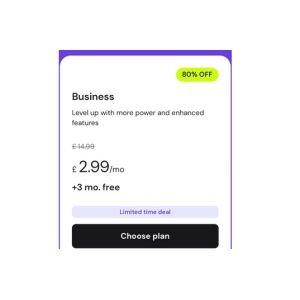
I chose Hostinger’s Business Web Hosting plan, which cost £2.99 per month for 48 months.
That’s 4 years — plenty of time to:
- test ideas
- grow content
- learn blogging and affiliate marketing
- see whether your online business is working
For beginners, this long time horizon is incredibly valuable. You’re not rushing to “make it work” in a few months.
What this plan includes:
- Business Web Hosting
- WordPress with AI tools
- Free domain name for 1 year
- 3 additional months of hosting free
- Enough resources to scale as your site grows
From a cost perspective, this makes it a low-pressure, cost-effective starting point.
What You Can Do With a Hostinger Website
Starting with a simple website opens up many possibilities over time. For example, you can:
- write blog posts and earn through affiliate links
- build content for Pinterest traffic
- document your learning and experiences
- create digital products later (ebooks, guides, resources)
- grow an email list
- build an online presence without relying only on social media
You don’t need to do everything at once. A website allows you to start small and expand when you’re ready.
How I Created My Website Using Hostinger’s Built-In AI
Here’s what the process looked like for me:
Step 1: Sign up and choose a plan
I selected the Business Web Hosting plan and created my account.
Step 2: Install WordPress
Hostinger installed WordPress automatically — no technical steps required.
Step 3: Use the AI to get started
The AI asked simple questions about:
- what my website is about
- the tone I wanted (calm, reflective, informational)
- whether it’s a blog or personal site
I used prompts like:
- “A personal finance and self-development blog for beginners”
- “Calm, non-salesy tone”
- “Focused on long-term thinking and learning”
The AI then created page structures and drafts, which I edited in my own words.
Step 4: Edit and publish slowly
I didn’t aim for perfection. I edited pages gradually and published when things felt clear and functional.
A website is something you grow into — not something you need to finish immediately.
Pros and Cons (Honest View)
Pros:
- Very affordable for beginners
- Built-in AI reduces overwhelm
- Easy WordPress setup
- Long-term scalability
- You own your platform
Cons:
- Not instant income
- Requires patience and consistency
- You still need to learn basics over time
Being honest about this builds realistic expectations — and that’s important.
20% Discount for Getting Started
If you decide to try Hostinger, you can get 20% off by using my referral link.
It’s the same service and features — just at a lower price — and it supports my work at no extra cost to you.
Final Thoughts
If you’re looking for a beginner-friendly, affordable way to build your own website, Hostinger is a strong option.
It doesn’t promise overnight success — but it provides the foundation you need to build something real, stable, and long-term.
Especially if you’re planning to use blogging, Pinterest, or affiliate marketing as part of your online journey, owning your website is one of the most important first steps you can take.